Introduction
Remote work, freelance design, stock trading and software coding all share one universal pain point: limited laptop screen real estate. Constant tab switching, cramped chart layouts and split-screen lag slow down daily workflows, forcing professionals to choose between bulky stationary monitors or compromised productivity on the go.
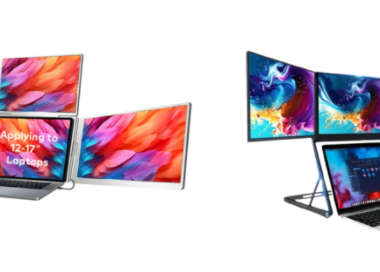
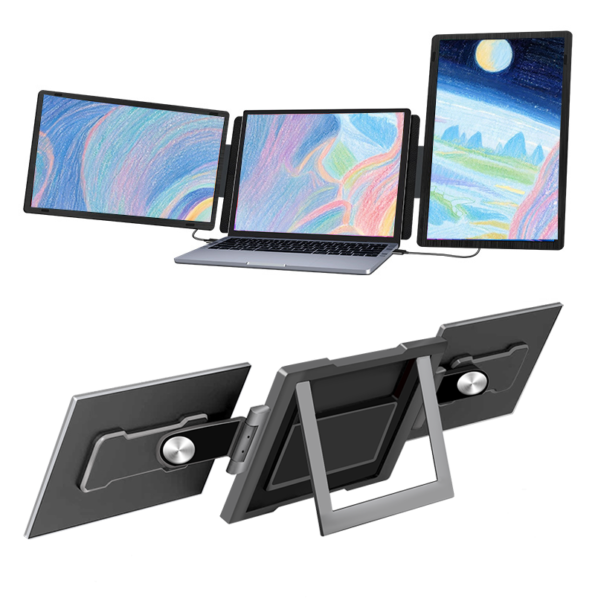
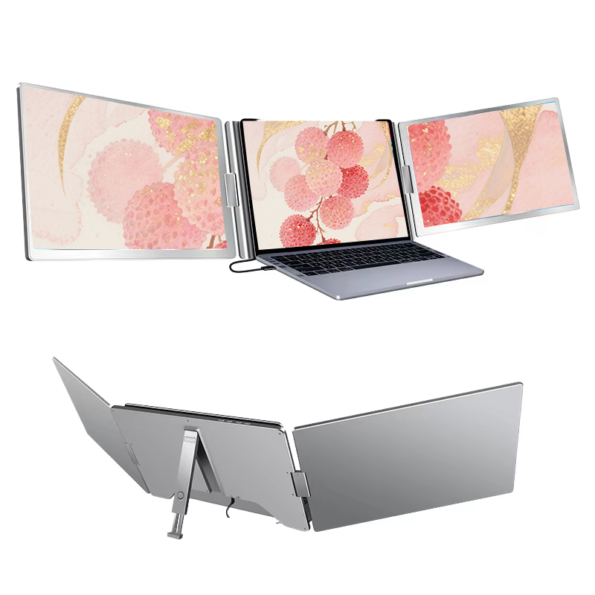
At ZWdisp, we designed our full series of portable dual screen laptop extenders to solve this exact dilemma. Our foldable dual-screen monitors transform any standard Windows or macOS laptop into a compact triple-display workstation within seconds, with plug-and-play USB/Type-C connectivity and lightweight foldable frames built for business trips, coffee shop work sessions and home office setups. Available in 11.6-inch up to 16-inch sizes, covering Full HD 1080P and sharp 2K (2560×1440) IPS panel variants, our dual screen extenders cater to every user from entry-level remote staff to professional graphic designers and day traders.
If you are tired of juggling dozens of browser tabs, code windows and market charts on a tiny single laptop screen, this complete guide breaks down every model, core technical specification, key use case and ergonomic advantage of ZWdisp dual screen laptop extenders. Whether you seek a budget-friendly 1080P dual extender or a high-brightness rotating 14-inch 2K model, our dual-screen product category holds a tailored solution for your mobile workspace upgrade.
Chapter 1: Core Advantages of ZWdisp Portable Dual Screen Extenders
Traditional desktop dual-monitor rigs demand dedicated desk space, multiple power cords and heavy hardware that cannot travel. Our foldable dual-screen laptop expanders reimagine multi-screen productivity with four unbeatable core strengths.
1.1 True Portability & Foldable Aluminum Build
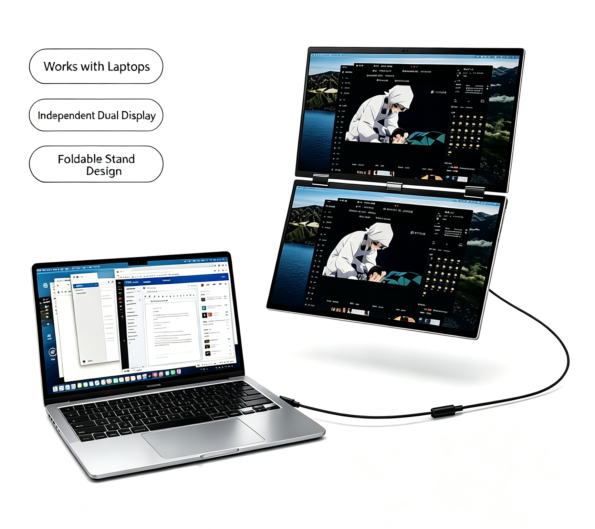
Most ZWdisp dual-screen models adopt premium aluminum alloy frames, cutting overall weight while delivering rigid scratch resistance for frequent travel. The dual-panel folding design collapses flat to match the thickness of your laptop, fitting seamlessly inside backpacks, briefcases and carry-on luggage for business travel or co-working visits. We offer two form factors: left-right horizontal dual extenders and vertical upper-lower dual monitor foldable units, plus rotating 360° variants for vertical document viewing. Touch-screen dual monitor options are also available for users who prefer capacitive interactive control without a mouse.
1.2 Plug-and-Play USB-C Single Cable Connection
No messy multi-cable setups required. Every ZWdisp dual screen laptop extender supports all-function Type-C one-line transmission, handling power supply, video signal and audio output simultaneously. For older laptops without full-featured USB-C ports, universal USB-A and HDMI fallback ports are integrated to maintain wide device compatibility with Windows, MacBook, Chromebook and even smartphones. Once clipped onto your laptop lid, plug in the cable and your triple-screen workstation activates instantly with zero driver installation.
1.3 Versatile Screen Sizes & Resolution Tier Options
Our dual-screen product catalog spans an extensive size and resolution range to match distinct professional demands:
- Entry-level daily office models: 11.6/13.3/14/15.6/16-inch dual panels, 1920×1080 Full HD IPS, 220–280 cd/m² brightness, 1000:1 static contrast ratio, 5ms response time, standard 46% NTSC color gamut for document editing, online meetings and basic data entry.
- Professional high-end variants: 14-inch rotating dual screen and 16-inch triple display extender with 2560×1440 2K resolution, boosted 400 cd/m² peak brightness for clear visibility under indoor and soft outdoor ambient light, sharper pixel density ideal for detailed graphic design, video editing and financial chart analysis.
- Large-format business dual monitors: 15.6-inch × 2 or 18.5-inch × 2 vertical dual-screen aluminum rigs for fixed home office or trading desk permanent multi-screen layouts.
All panels adopt standard 16:9 aspect ratio and stable 60Hz refresh rate, eliminating screen flicker and reducing eye strain during 8+ hour workdays.
1.4 Ergonomic Multi-Angle Adjustment & Touch Upgrade
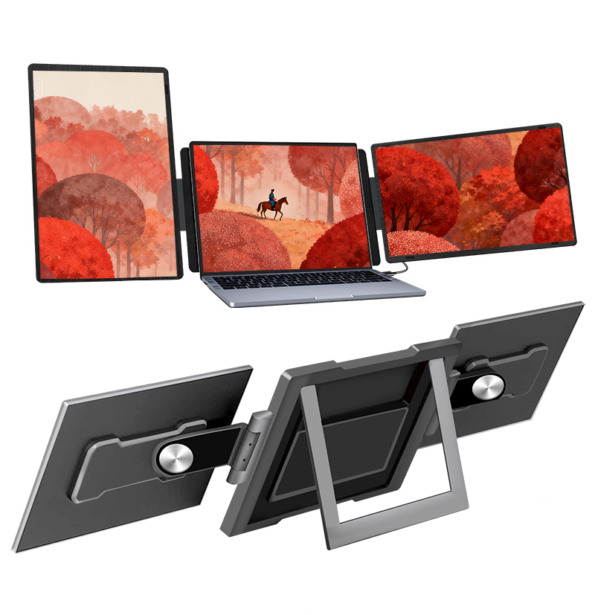
Rotating dual-screen units support full horizontal and vertical rotation, letting you flip one panel vertically to read long code scripts, spreadsheets or design mockups without constant scrolling. Standard foldable frames deliver adjustable tilt angles to align screen height with eye level, eliminating neck hunching and cervical fatigue after long work hours. For customer-facing consultants and creative designers, our capacitive touch dual monitor models enable direct on-screen annotation, sketching and document control to streamline client presentations and creative workflows.
Chapter 2: Top Industry Use Cases for ZWdisp Dual Screen Laptop Extenders
Our portable dual-screen monitors are purpose-built for four high-demand professional groups, each gaining unique workflow improvements from expanded triple-screen space.
2.1 Software Developers & Coders
Programmers constantly split attention between code editors, API documentation, debug consoles and test previews. With a ZWdisp dual extender, your native laptop screen holds the main coding IDE, one external panel displays reference documentation and terminal logs, while the second screen hosts live application previews or Git management windows. The 2K high-resolution 14-inch rotating dual model excels here: vertical rotation fits hundreds of lines of Python, Java or JavaScript code without horizontal scrolling, and the fast 5ms response time eliminates visual lag when switching between development tabs.
2. Stock, Crypto & Forex Day Traders
Financial traders rely on real-time multi-chart tracking to capture market movement signals. A dual-screen laptop extender turns your single notebook into three independent chart displays: main laptop screen for overall market index trends, left dual panel for short-term minute charts, right panel for asset order books and news feeds. Our 15.6-inch vertical dual aluminum monitor set delivers consistent 220–300 cd/m² brightness, guaranteeing clear chart line visibility in office lighting, while the 1000:1 contrast ratio distinguishes subtle candlestick color gradients critical for technical analysis.
2.2 Graphic Designers, Video Editors & Content Creators
Visual creators demand precise color reproduction and wide canvas space for retouching, timeline editing and asset management. ZWdisp’s 400 cd/m² 14-inch 2K dual IPS panels deliver finer pixel detail for Photoshop layer editing, Illustrator vector work and Premiere Pro timeline manipulation. Users can drag the video timeline to one secondary screen, asset library to the other, leaving the main laptop display for high-resolution preview rendering. The uniform IPS panel viewing angle prevents color shifting when viewing screens from side angles, a common flaw in low-cost portable expanders.
2.3 Remote Workers, Consultants & Business Travelers
General remote employees, sales consultants and project managers handle email chains, Zoom meeting windows, spreadsheets and presentation slides simultaneously. A compact 13.3/14-inch FHD dual screen extender slips easily into travel luggage for hotel room or co-working office setups. During client meetings, extend one screen to display pitch decks while reserving the laptop screen for speaker notes and real-time research lookup. Touch-screen dual monitor models add extra value for on-site client consultations, allowing direct marking on presentation slides without extra drawing tablets.
Chapter 3: Breakdown of ZWdisp Main Dual Screen Product Models
All our dual-screen laptop expanders fall under the dedicated dual-screen product category on ZWdisp official store, with distinct model codes ZW14, ZW156 and ZW16 corresponding to core screen sizes. Below is a simplified overview of flagship options:
- ZW14 Series (14-inch dual screen) Two sub-options: 1080P standard dual extender and rotating 2K high-brightness variant (400 cd/m²). Best for frequent travelers, coders and on-location designers seeking compact size and sharp resolution. Rotation function is exclusive to the 2K ZW14 model for vertical workflow optimization.
- ZW156 Series (15.6-inch dual screen) Our best-selling universal model, offered in horizontal left-right foldable, vertical upper-lower aluminum frame and capacitive touch screen editions. 1920×1080 FHD IPS panel, 220–280 cd/m² adjustable brightness, ideal for traders, home office remote workers and video creators prioritizing larger screen area without excessive bulk.
- ZW16 Series (16-inch dual triple display extender) High-end 2.5K dual-panel workstation for power users requiring maximum visual space. 2560×1440 resolution, 250 cd/m² typical brightness, 5ms response time, designed for heavy multi-tasking such as long-form video editing, multi-asset trading and large database data analysis.
- Large-format 18.5-inch dual aluminum monitors Static vertical dual-screen rigs targeted at permanent home trading desks and fixed office workstations, with wider color gamut consistency and sturdy alloy stands for all-day stationary use.
Chapter 4: Frequently Asked Buying Questions About Portable Dual Screen Extenders
Q1: Will a dual screen extender damage my laptop lid?
All ZWdisp dual-screen units use soft silicone clip mounts with adjustable tension, avoiding scratch or pressure damage to laptop casings. Foldable support brackets distribute weight evenly across the laptop back panel to prevent lid warping during long-hour use.
Q2: Are dual extenders compatible with all laptops?
Yes. Full-featured Type-C one-cable connection works with MacBook Air/Pro, Windows ultrabooks, Lenovo, Dell, HP and Chromebooks. Devices lacking USB-C video output can connect via included HDMI to USB adapter cables in every product package.
Q3: What brightness level should I choose?
220–280 cd/m² FHD models suit indoor home and office environments. The 400 cd/m² 2K ZW14 rotating version is recommended if you regularly work near windows or in bright co-working spaces for clearer screen visibility.
Q4: Do touch dual screen models require extra drivers?
Capacitive touch panels operate plug-and-play with Windows and macOS; no third-party driver downloads are required. Touch input transmits via the same Type-C video/power cable for simplified wiring.
Conclusion
Single-laptop-screen productivity limits no longer need to define your professional workflow. ZWdisp’s full lineup of portable dual screen laptop extenders merges triple-display workstation performance with travel-ready portability, catering to coders, traders, designers and remote workers across every budget and use case. With flexible size tiers, 1080P and premium 2K IPS panel options, rotating ergonomic frames and durable aluminum construction, our dual-screen expanders deliver an instant workspace upgrade that travels wherever your work takes you.
Browse the complete range of foldable dual monitors, touch-screen variants and large-format vertical dual rigs directly in our dedicated dual-screen product category page to select the model matching your screen size, resolution and mobility needs. Stop wasting valuable work time switching tabs—unlock seamless multi-tasking with a ZWdisp portable dual screen extender today.